In-house product · Case study
ShelfLife: helping a kitchen use what it already has
An in-house iPhone and iPad app that keeps track of what is in the kitchen and when it expires, then connects that record to meal ideas, cooking and one shopping list.
- Our role
- Product concept, design and development
The challenge
The product idea started with everyday kitchen questions: what needs using before it spoils, what to cook tonight and what to buy next. Each answer depends on the same record of what is in the kitchen and when it expires. The experience needed to keep that record quick to update and then put it to work, so expiration dates, meal ideas and restocking draw on one pantry rather than separate lists.
Project scope
- Pantry items with quantities, categories and expiration dates
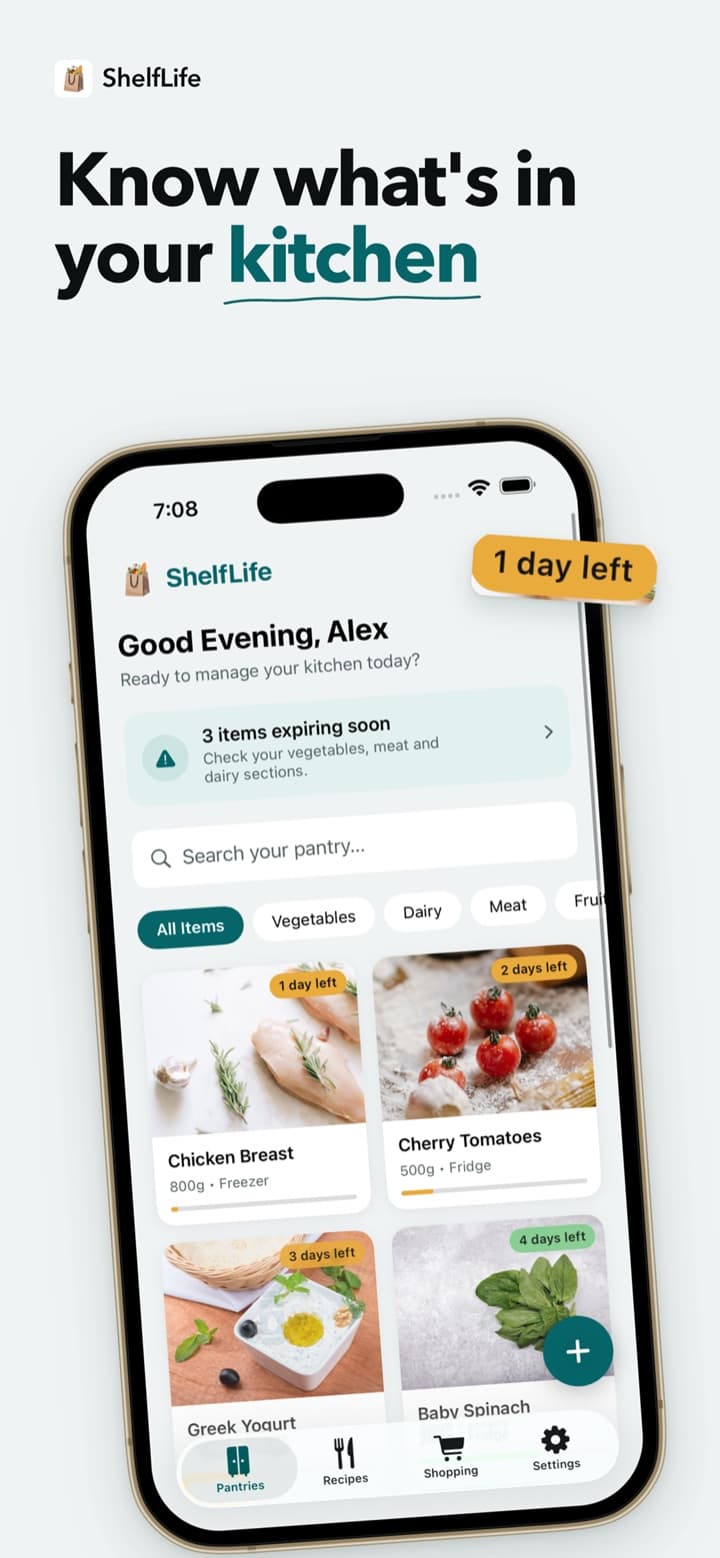
- Days-left badges, an Expiring Soon list and optional reminders
- On-device recipe suggestions ranked by pantry match
- Ingredient review that updates the pantry after cooking
- A categorized shopping list with pantry suggestions
- Sync across iPhone and iPad
How the experience comes together
Keep the pantry sorted by urgency
People add what they buy with a quantity, category and expiration date. The pantry is sorted by what needs using first, and days-left badges and an Expiring Soon list make dates visible without opening each item. Optional reminders arrive a chosen number of days before a date, so the record prompts action instead of waiting to be checked.
Start meal ideas from the pantry
Recipe suggestions are generated on the device from the items someone has, ranked by ingredient match and by what is expiring soon. Dietary preferences shape the suggestions, and favorites can be saved. Before confirming a recipe was cooked, people review the ingredients it uses, and ShelfLife deducts those quantities from the pantry. Recipe generation requires Apple Intelligence and iOS/iPadOS 26 or later.
Close the loop with one shopping list
A single categorized list suggests what is running low or about to run out. Checking an item off can add it straight back to the pantry, so the next shop updates the same record. Signing in with Apple or Google on each device keeps the pantry, list, saved recipes, preferences and cooking history together across iPhone and iPad.
Inside ShelfLife
Product screens showing the experience. Select an image to see it in detail.


What the product delivers
- A pantry record of quantities, categories and expiration dates, sorted by what needs using first.
- Meal suggestions and cooking confirmations that read from and update the same pantry.
- A shopping list that suggests restocks from the pantry and can return purchases to it, synced across iPhone and iPad.
This story describes the product’s capabilities. It does not report measured business results.
Published
Explore the related service
See the scope, delivery process and questions to consider for your own project.
Mobile App DevelopmentMore work to explore

ScroLearn
In-house product
ScroLearn: turning curiosity into a personalized learning feed
An in-house mobile product that takes a topic someone wants to explore and turns it into a feed of bite-sized posts, with adaptive follow-up questions, saved topics and sharing controls.
Read ScroLearn case study
GrowTogether
In-house product
GrowTogether: making habit progress visible to a group
An in-house habit-tracking app that brings group creation, daily check-ins, shared progress and encouragement into one mobile experience for friends and family.
Read GrowTogether case studyHave a product in mind?
Tell us about the people it needs to help and the problem it should solve. We can start with a rough idea.
Discuss a similar project